# IPFS private network on AWS, slower than local machine
**URL:** https://discuss.ipfs.tech/t/ipfs-private-network-on-aws-slower-than-local-machine/3990
**Category:** Help
**Created:** [October 2, 2018, 10:41pm UTC](https://discuss.ipfs.tech/t/ipfs-private-network-on-aws-slower-than-local-machine/3990 "2018-10-02T22:41:45Z")
**Posts on this page:** 6
**Page:** 1
### Author:  [@OhJerry](https://discuss.ipfs.tech/u/OhJerry)
#### Post date: [October 2, 2018, 10:41pm UTC](https://discuss.ipfs.tech/t/ipfs-private-network-on-aws-slower-than-local-machine/3990/1 "2018-10-02T22:41:45Z")
I am trying to build a private network on AWS (Amazon Web Service). Now the network is successfully built, but still remains some issue. Here is how I build the private network:
Start a EC2 instance:
1. sudo yum install golang
2. adding these to .bashrc:
export PATH=$PATH:/usr/local/go/bin
export GOPATH=$HOME/Go
export PATH=$PATH:$GOPATH/bin
3. source .barshrc
4. go get -u -d [GitHub - ipfs/kubo: An IPFS implementation in Go](http://github.com/ipfs/go-ipfs)
5. cd $GOPATH/src/github.com/ipfs/go-ipfs
6. make install
IPFS private network:
1. ipfs init
2. go get -u [github.com/Kubuxu/go-ipfs-swarm-key-gen/ipfs-swarm-key-gen](http://github.com/Kubuxu/go-ipfs-swarm-key-gen/ipfs-swarm-key-gen)
3. ipfs-swarm-key-gen \> ~/.ipfs/swarm.key
# Servers share the same key
4. ipfs bootstrap rm --all
ipfs daemon
5. ipfs id
6. ipfs bootstrap add -----------------
7. (ipfs swarm peers)
**However, here is the problem: the file transmitting speed is about two times slower than on local machines.**
When I say “slower” I am comparing it with performance of **rsync** in same environments. The private network I am building contains only two servers, so it should be a simple one-to-one transmitting, and the speed should be about the same as “rsync ssh”.
Here are some stats transmitting 1GB file from private network I build on my local machines, you could see from it that the real time is almost the same:
Local machine: rsync -avzhe ssh:
real 0m12.219s
user 0m4.976s
sys 0m3.720s
Local machine: ipfs pin add (a faster version of “ipfs get”, this will automatically pin the blocks you retrieve):
real 0m12.001s
user 0m0.036s
sys 0m0.008s
But when using AWS EC2, I tried both dedicated and shared tenancy, the speed of ipfs would be much slower than that of rsync:
AWS: rsync -avzhe ssh:
real 0m23.613s
user 0m8.629s
sys 0m5.245s
AWS: ipfs pin add:
real 0m50.343s
user 0m1.664s
sys 0m3.883s
As we could see, ipfs takes about double time to transmit the file.
I am currently working on this and trying to find out what makes the difference. I have already emailed AWS support, and was informed that they did not block ipfs intentionally, so there should not be such difference.
I wonder is there anyone who has experience with it, and maybe could let me know what is the cause of the situation. Below I attached info about the EC2 instance I created.

---
### Author:  [@leerspace](https://discuss.ipfs.tech/u/leerspace)
#### Post date: [October 3, 2018, 1:38am UTC](https://discuss.ipfs.tech/t/ipfs-private-network-on-aws-slower-than-local-machine/3990/2 "2018-10-03T01:38:28Z")
What are the specs of your local machines?
---
### Author:  [@chris](https://discuss.ipfs.tech/u/chris)
#### Post date: [October 4, 2018, 12:19am UTC](https://discuss.ipfs.tech/t/ipfs-private-network-on-aws-slower-than-local-machine/3990/3 "2018-10-04T00:19:32Z")
My best guess would be because of network latency differences between your local environment and AWS.
IPFS currently requires more networking round trips compared to rsync so higher latency links will effect it more. By default AWS randomly fires up instances anywhere in the selected zone leading to having to potentially travel through many switches to communicate with each other.
You can try using an EC2 placement group in cluster mode to force instances to be physically close to each other and therefore have a low latency. Downside with this is you may need to use larger instances (ex. m5.large) to utilize it.
Side note: T3 instances launched a few weeks ago so I highly recommend using them over T2, they are much faster and slightly cheaper.
---
### Author:  [@OhJerry](https://discuss.ipfs.tech/u/OhJerry)
#### Post date: [October 9, 2018, 9:37pm UTC](https://discuss.ipfs.tech/t/ipfs-private-network-on-aws-slower-than-local-machine/3990/5 "2018-10-09T21:37:18Z")
Actually the problem remains, for this time, although ipfs pin add is much faster: 25s, rsync takes even less time: 10s.
So there still exists a speeding issue.
---
### Author:  [@OhJerry](https://discuss.ipfs.tech/u/OhJerry)
#### Post date: [October 9, 2018, 9:57pm UTC](https://discuss.ipfs.tech/t/ipfs-private-network-on-aws-slower-than-local-machine/3990/6 "2018-10-09T21:57:15Z")

Though I do not think this is a problem with spec of machine.
---
### Author:  [@OhJerry](https://discuss.ipfs.tech/u/OhJerry)
#### Post date: [October 9, 2018, 10:01pm UTC](https://discuss.ipfs.tech/t/ipfs-private-network-on-aws-slower-than-local-machine/3990/7 "2018-10-09T22:01:34Z")
rsync:
real 0m9.846s
user 0m8.457s
sys 0m2.980s
real 0m6.754s
user 0m8.497s
sys 0m2.592s
ipfs:
real 0m25.017s
user 0m0.023s
sys 0m0.009s
real 0m24.080s
user 0m0.027s
sys 0m0.005s
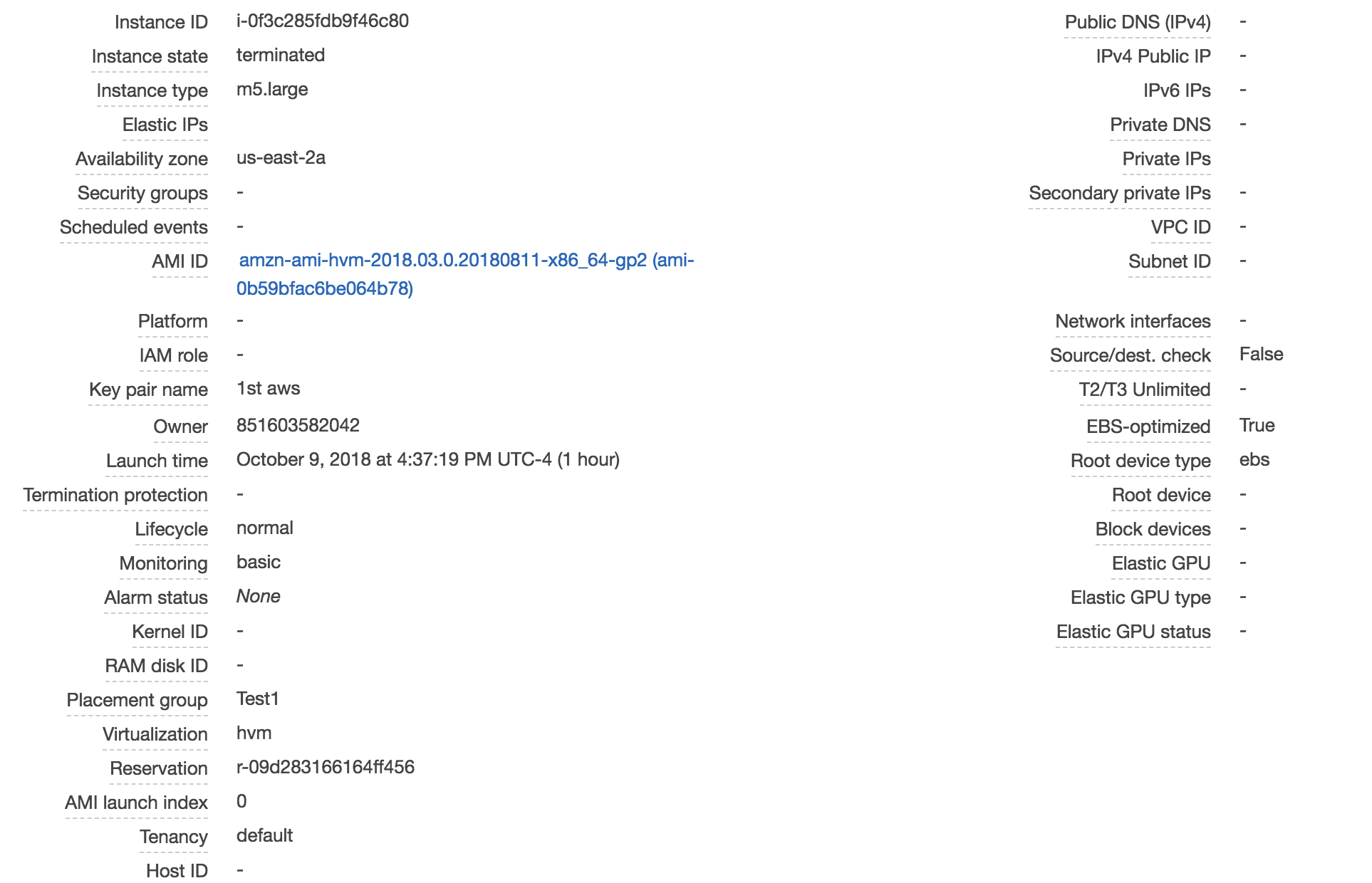
This is the info about instances I am using. I am not using T3 because it does not support the placement group mode.
For this time, although they are both faster (should because of the upgrade of instance type), rsync is still way much faster than ipfs. Still not sure why. Thanks for your suggestion and I really appreciate it. Do you have any other thoughts on it?